How Can You Pay for Fuel Digitally at a Gas Station?
Gusti Ayu Tita P
17 September 2026
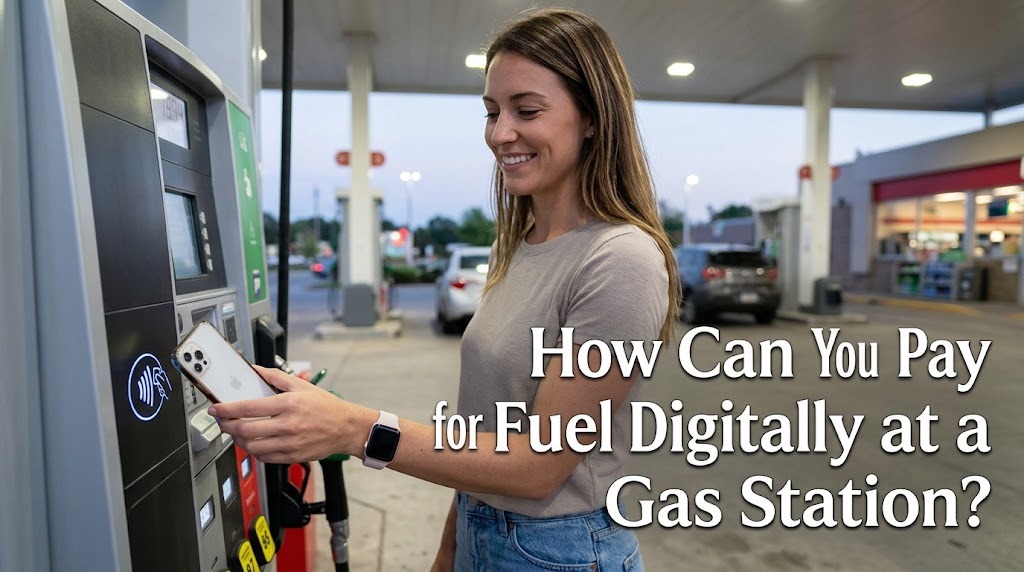
Paying for fuel digitally at a gas station has become increasingly common as technology changes the way people manage everyday transactions. Instead of preparing cash, drivers can use mobile banking, digital wallets, contactless payments, or other electronic payment methods when purchasing fuel. This option can make the refueling process more convenient and reduce the need to handle physical money. However, drivers should understand how digital payments work before using them. Choosing a secure payment method can also help protect personal and financial information.
PREPARE YOUR DIGITAL PAYMENT METHOD
Before arriving at a gas station, drivers should make sure their digital payment method is ready to use. A mobile banking application or digital wallet should be installed on a trusted device and connected to an active payment account. Drivers should also check whether their phone has enough battery and whether the application can connect to the internet. If a gas station supports contactless payments, a compatible bank card or mobile device may also be used. Preparing these things in advance can make the refueling process faster and more convenient.
Drivers should also check their account balance or payment limit before purchasing fuel. Some digital payment services may have daily transaction limits or require additional verification for certain transactions. It is useful to keep an alternative payment method available in case the digital system is temporarily unavailable. Drivers should never share their PIN, password, or one-time verification code with other people. These simple precautions can help make digital fuel payments safer.
CHECK THE AVAILABLE DIGITAL PAYMENT OPTIONS
Not every gas station supports exactly the same payment methods, so drivers should check the available options before refueling. Common methods can include QR payments, debit cards, credit cards, mobile banking, and digital wallets. Some stations may display payment logos near the fuel pumps, cashier area, or entrance. Drivers can also ask the station attendant which digital payment methods are currently accepted. Knowing this information can prevent delays during the transaction.
QR payments are particularly useful because they allow customers to make transactions using a smartphone. Depending on the payment system, customers may need to scan a QR code provided by the station or show a payment code to the attendant. After completing the transaction, customers should wait for the payment confirmation before leaving. Payment confirmation is important because it provides evidence that the transaction was successfully processed. Keeping the digital receipt can also help if there is a problem with the payment later.
FOLLOW THE DIGITAL PAYMENT PROCESS
The exact payment process can differ depending on the gas station and payment provider. Generally, the driver first tells the attendant the type and amount of fuel needed. After fueling is completed, the driver selects the supported digital payment option and follows the instructions shown on the payment terminal or smartphone. For QR payments, the customer usually scans the station's QR code and confirms the transaction through the payment application. The driver should carefully check the amount before approving the payment.
When using a card or mobile device, the payment may require contactless technology, a PIN, or another form of authentication. Drivers should make sure the payment screen shows the correct transaction amount before completing the process. Once payment is approved, the driver should check the receipt or transaction notification. If the payment appears unsuccessful, drivers should avoid immediately making another payment without checking the transaction status first. This can help prevent accidental duplicate payments.
KEEP YOUR DIGITAL TRANSACTIONS SECURE
Digital payments are convenient, but they require good cybersecurity habits. Drivers should only use official banking applications and trusted payment platforms when paying for fuel. Applications should be updated regularly because updates can include important security improvements. Public or unsecured Wi-Fi should be avoided when making sensitive financial transactions whenever possible. Drivers should also use a strong device password or biometric protection to prevent unauthorized access.
It is equally important to protect PINs, passwords, and verification codes. These details should never be given to station employees, strangers, or anyone claiming to need them for a payment. Drivers should be careful when scanning QR codes and confirm that the payment information belongs to the correct merchant before approving the transaction. After payment, checking the transaction notification can help identify unusual activity quickly. If an unfamiliar transaction appears, the customer should contact the relevant bank or payment provider through its official support channel.
SAVE AND CHECK YOUR DIGITAL RECEIPT
A digital receipt can be useful for tracking fuel expenses and confirming that a payment has been completed. Many banking applications and digital wallets automatically save transaction information after a successful payment. Drivers can use these records to monitor their fuel spending over time. This can be particularly helpful for people who regularly travel for work, business, or long-distance trips. Keeping transaction records can also make it easier to identify unexpected charges.
Drivers should check important information such as the payment amount, date, merchant name, and transaction status. If the amount shown in the payment application differs from the expected fuel cost, the driver should clarify the issue with the station before leaving. Digital receipts can also provide useful evidence when requesting assistance with a disputed transaction. However, drivers should avoid sharing screenshots of receipts publicly if they contain sensitive financial or personal information. Proper record keeping combines convenience with better financial awareness.
CONCLUSION
Digital payment makes purchasing fuel at a gas station faster, more convenient, and easier to track. Drivers can use methods such as QR payments, digital wallets, mobile banking, debit cards, credit cards, and contactless payments when supported by the station. Before paying, they should check the accepted payment options, verify the transaction amount, and wait for confirmation. Protecting passwords, PINs, and verification codes is also essential for maintaining payment security. By using trusted payment services and keeping digital receipts, drivers can enjoy the convenience of modern fuel transactions while managing their expenses responsibly.
About the Author
Gusti Ayu Tita P
Author — STEKOM University
An active author focused on academic issues, educational technology, and human resource development in the campus environment.